


SENEAR
FREE ANDROID APP

Make your parents’ old phone simple. Peace of mind for you.

Big photo call buttons and an SOS button for your parent. Only approved numbers can call, and you can see that everything is okay. An old Android phone is all it takes.

Download on Google Play – Free

The senior’s phone is free forever · family features free for 14 days

The senior’s phone needs Android 8.0+. A web version for family members with iPhones is in the works →

QR code for the SENEAR Google Play page

Open it on your phone

Scan the QR code with your Android phone’s camera, or copy the link and send it to yourself.

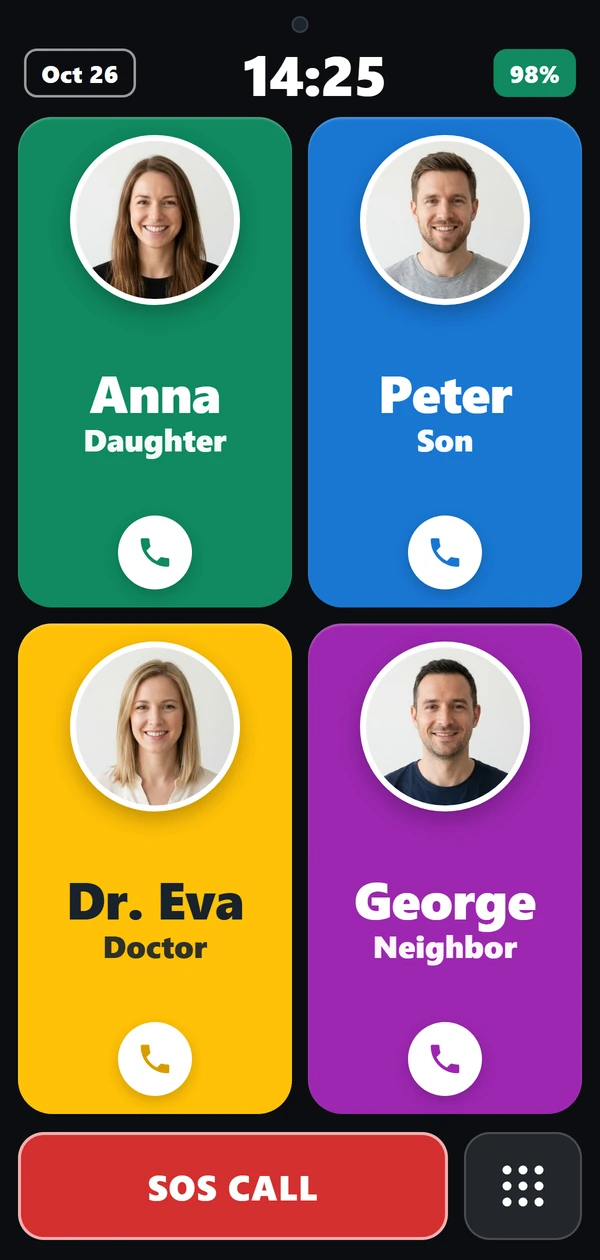
The SENEAR locked, simple home screen: four large photo call buttons (Anna, Peter, Eva, George – sample data) and a red SOS button at the bottom.
Unknown number? It never rings. Anna’s call comes through.

If you worry about them too…

Sound familiar?

  • “Mom always picks up unknown numbers. I’m afraid one day it’ll be a scammer.”

    Solution

    Only numbers you approve can call your parent. Unknown callers never ring through.

  • “Dad accidentally mutes his phone, and then I can’t reach him for days.”

    Solution

    Locked home screen that can’t be changed by accident. Restore volume remotely.

  • “I live in another city. I just want to know they’re okay.”

    Solution

    See battery and location on your own phone, and get notified right away on SOS.

Why SENEAR?

Two ways to use it

Start with just your parent’s phone, and connect your own whenever you like.

Just your parent’s phone

One phone, no second device needed.

  • Locked, simple home screen with large photo call buttons
  • Only numbers you approve can call
  • Large SOS button with automatic GPS text message
  • Ad-free
TIP

An old phone from the drawer is enough.

No need to buy a new device — any phone with Android 8.0 or newer works.

Free forever
Family remote connection

Your parent’s phone connects to your own Android phone.

  • Live status: battery, signal, location
  • Notifications for SOS, low battery, power off
  • Medication reminders with “Taken” confirmation
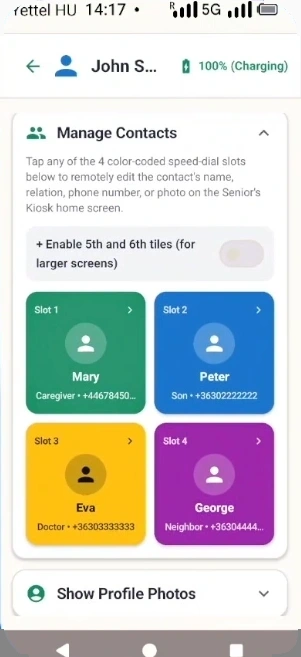
  • Set call buttons and call filtering remotely
Try it free for 14 daysSee pricing

How it works · Two phones, one story

Three steps – you set it up, they already see it.

No new phone needed, two Android devices are enough. Add a new call button on your own phone and a few seconds later it appears on your parent’s home screen.

  1. 1

    Install it on your parent’s phone

    Any existing Android 8.0+ phone, even without a SIM card on home Wi-Fi.

  2. 2

    Connect with a 6-digit code

    Your parent approves it on their phone, and the two devices are linked.

  3. 3

    Manage remotely, calmly

    Set up photo call buttons, reminders and the safe zone from your own phone.

1Pick the 4th purple tile on your phoneIllustrative animation with sample data.

First setup takes about 10–15 minutes. The video walks you through every step.Open the video

1On your parent’s phone

  • Locked, simple home screen (works without a second phone)
  • 4 or 6 large photo call buttons with names and a “Missed call!” badge
  • Adjustable text, photo and icon size
  • SIM calls plus SIM-free Wi-Fi voice and video calls
  • Automatic speakerphone with on-screen volume control
  • Pre-written quick texts, large-print incoming messages
  • SOS call and automatic GPS text message
  • Alarm and daily reminders
  • Photo medication reminder with a “Taken” button

2Between the two phones

  • Linking with a 6-digit code, approved by your parent
  • Several family members can connect
  • Real-time sync on EU servers
  • Manufacturer-specific battery settings (Samsung, Xiaomi, Huawei, etc.)
  • Encrypted data transfer (TLS)
  • GDPR-compliant, one-tap permanent data deletion

3On your phone

  • Notifications on power off/on and low battery
  • Voice and video calls to your parent’s phone, also over Wi-Fi
  • Remotely enabled automatic, hands-free call answering
  • Restore ringer volume remotely
  • Call button names, numbers and photos remotely
  • Call filtering: manage the approved numbers remotely
  • Alarms and medication reminders with confirmation
  • Home safe zone and live mini-map

Watch it in 13 minutes

The complete setup in 12 steps

Click a step and the video jumps there. Your phone is on the left, your parent’s on the right.

Left phone: the family member’s phoneRight phone: the parent’s phone

Why does Android ask for permissions?

During first setup Android asks for a few one-time permissions: caller ID & spam filter, display over other apps, default home app, notification access, turning off battery optimization and the optional Kiosk Guard accessibility service. They block scam calls, keep the home screen locked and let calls start on speaker automatically. The video walks you through each one. In the app, the family member role is called “Caregiver” and the parent’s role “Senior”.

The 12 steps of the video

12:55

Pricing

Your parent’s phone is always free.

You only pay for the family remote connection, and you can try it free for 14 days.

Free

Your parent’s phone on its own

€0forever
  • Locked, simple home screen
  • Large photo call buttons
  • Only approved numbers can call
  • SOS button with GPS text message
  • Ad-free
  • 4 or 6 large photo call buttons with names and a “Missed call!” badge
  • Adjustable text, photo and icon size
  • Automatic speakerphone with on-screen volume control
  • Pre-written quick texts, large-print incoming messages
  • Alarm and daily reminders
  • Photo medication reminder with a “Taken” button
  • GDPR-compliant, one-tap permanent data deletion
Recommended
14 DAYS FREE

Family connection

Your parent’s phone + your phone

€9.99€7.99/ month
less than27¢a day

Introductory price · Cancel anytime

  • Everything in Free
  • Live battery, signal and location
  • Notifications for SOS and low battery
  • Medication & daily reminders
  • Remote settings
  • Wi-Fi voice and video calls
  • Linking with a 6-digit code, approved by your parent
  • Notifications on power off/on and low battery
  • Remotely enabled automatic, hands-free call answering
  • Restore ringer volume remotely
  • Call button names, numbers and photos remotely
  • Call filtering: manage the approved numbers remotely
  • Alarms and medication reminders with confirmation
  • Home safe zone and live mini-map
  • Manufacturer-specific battery settings (Samsung, Xiaomi, Huawei, etc.)
  • Real-time sync on EU servers, encrypted data transfer (TLS)
FOR 2 PEOPLE

Lifetime

Family link, no monthly or annual fees

€199.00€149.00/ once
just€74.50each

For 2 family members (e.g. both son and daughter) – split the one-time cost!

  • Lifetime access for 2 family members
  • No monthly or annual fees
  • Pay once securely via Google Play
  • Everything in Free and Family connection
  • Manageable from 2 family members’ phones at the same time
  • Live battery, signal, mini-map and home safe zone
  • Notifications for SOS, power off/on and low battery
  • Voice and video calls to your parent’s phone over Wi-Fi
  • Remotely enabled automatic, hands-free call answering
  • Restore ringer volume remotely
  • Call buttons, photos, call filtering and medication reminders remotely
  • Real-time sync on EU servers, GDPR-compliant

Billed securely via Google Play in your local currency on the family member’s phone only (your parent’s screen never shows payment prompts). Cancel anytime with one tap.

  • Built in Europe
  • Ad-free
  • GDPR-compliant

FAQ

Frequently asked questions

Yes, they do. The two phones only connect if your parent explicitly approves it on their own phone. After that you see the battery level, medication confirmations and (if enabled) location. You never see private messages or hear conversations. All data can be permanently deleted with one tap at any time.

Both phones need Android 8.0 or newer (e.g. Samsung, Xiaomi, Motorola, Honor, Pixel). It doesn’t work on iPhone, because iOS doesn’t allow this kind of home screen lock or automatic speakerphone. A web version for family members with iPhones is currently in development.

Never. Your parent’s phone stays 100% free of ads and payment prompts. After the 14-day free trial, the family member can choose on their own phone via Google Play between the introductory monthly plan (€7.99/mo instead of €9.99) or the discounted annual plan (€59.99/yr instead of €79.99 — just ~€4.99/mo, shown in your local Google Play currency).

Your parent’s phone keeps working for free: locked, simple home screen, call filtering, SOS. Only the remote connection stops.

Not necessarily. On home Wi-Fi, calls between the two phones, reminders and remote settings work without a SIM. Regular phone calls and texts need a SIM card.

Yes, anytime. Tap the clock at the top five times, enter the 4-digit PIN, and you can leave the locked home screen.

No. Any existing Android 8.0+ phone works, no factory reset needed.

Still have a question or need help with setup?

Join our closed SENEAR Facebook Community for direct support, or follow our official Facebook Page for practical tips and updates.

So you can sleep peacefully too.

Install it on your parent’s phone today. The basics are always free.

Download on Google Play – Free

14-day free trial for the family features

For Android 8.0+ devices (the family member’s phone also needs Android)